Why Meta keeps pushing CAPI (and why you should listen)
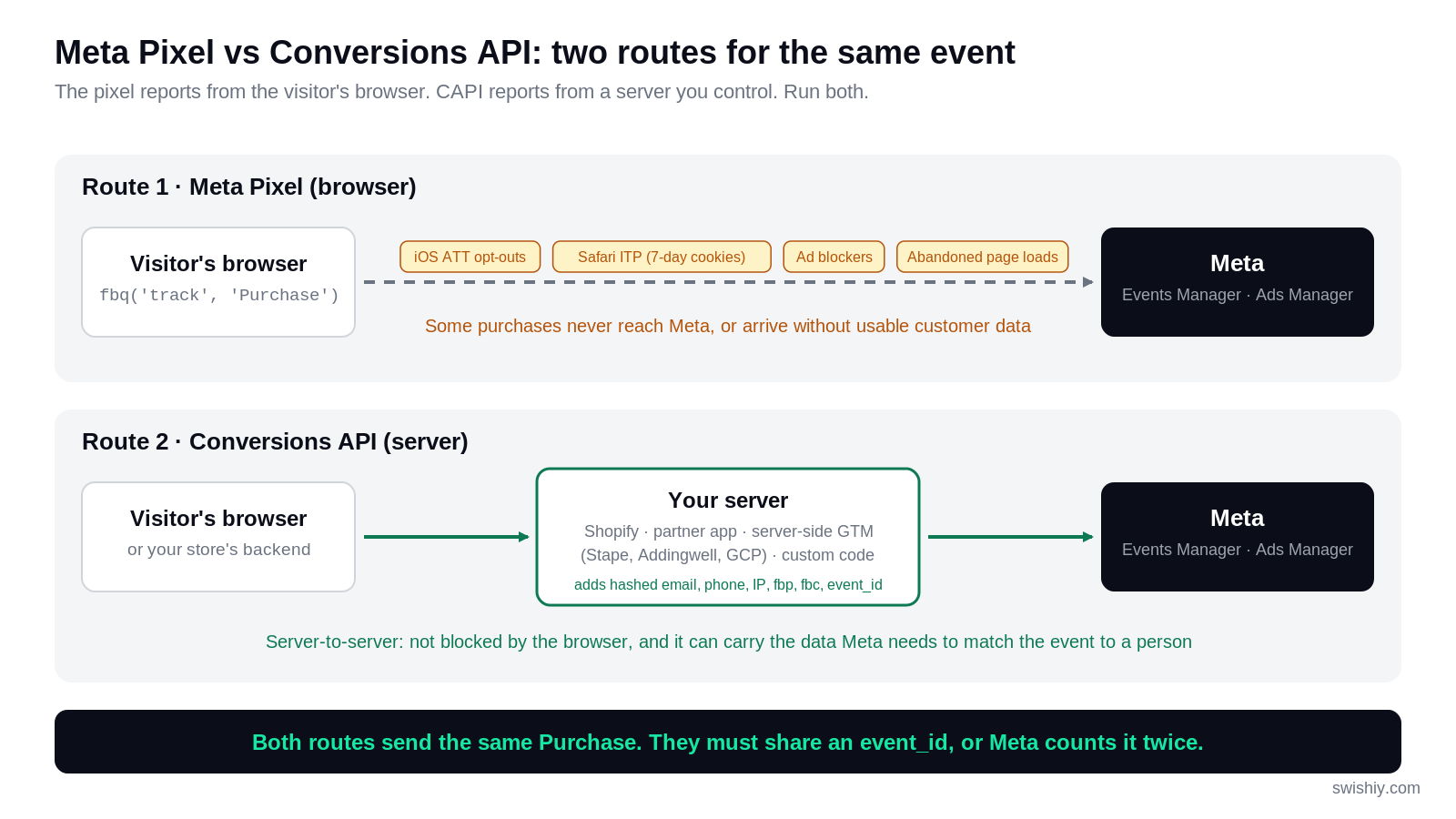
Since Apple's App Tracking Transparency prompt arrived with iOS 14.5 in 2021, most iPhone users have opted out of tracking in the Facebook and Instagram apps. In the browser, Safari caps JavaScript cookies at seven days and ad blockers remove the pixel entirely. A share of your purchases never reaches Meta, and many that do arrive without the identifiers Meta needs to match them to a person. Many accounts lose 5–15% of purchase events this way.
A server has none of those problems. It does not run an ad blocker, it does not lose cookies, and it holds the customer data your store already collected at checkout: the email, the phone number, the order ID. That is exactly what Meta uses to match a purchase to an account. The nagging in Ads Manager is Meta protecting its own bidding. For once, the incentives line up.
Free Google Ads Audit
See where your budget is going before you commit another month to guessing. Scans your search terms, conversion actions and brand leakage in minutes.
Run a free auditPixel + CAPI (not Pixel or CAPI)
Both should run. Think of them as two routes carrying the same purchase to Meta. The pixel gives Meta the browser context: the fbp cookie, the fbc click ID, the page the visitor was on. CAPI gives reliability and the customer data. Meta calls this a redundant setup, and it means the same event arrives from both sources.
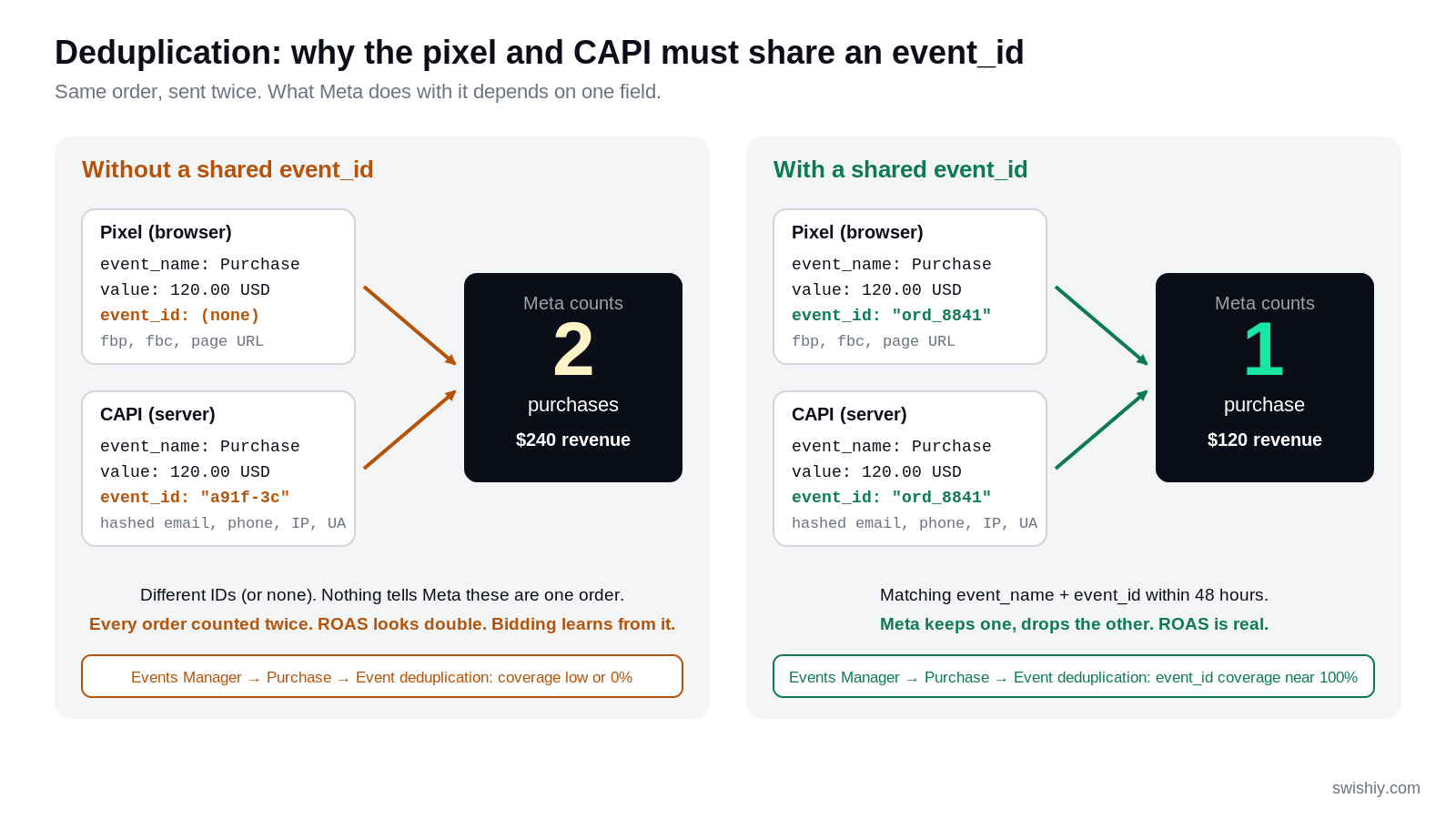
Here's where the setup can quietly go sideways. Two events per order is a problem Meta has to solve. It deduplicates them only if both carry the same event name and the same event ID (usually your order ID or another unique transaction ID sent from both sides). When they match, Meta keeps the first one it receives and drops the second. When they do not match, or one side sends no ID at all, every purchase is counted twice. Ads Manager shows double the purchases and double the ROAS, and the bidding algorithm learns from data that is wrong by a factor of two.
This is the most common CAPI failure we see in audits. The same thing happens on the Google side, and we covered the GA4 conversion tracking mistakes that inflate ROAS separately.
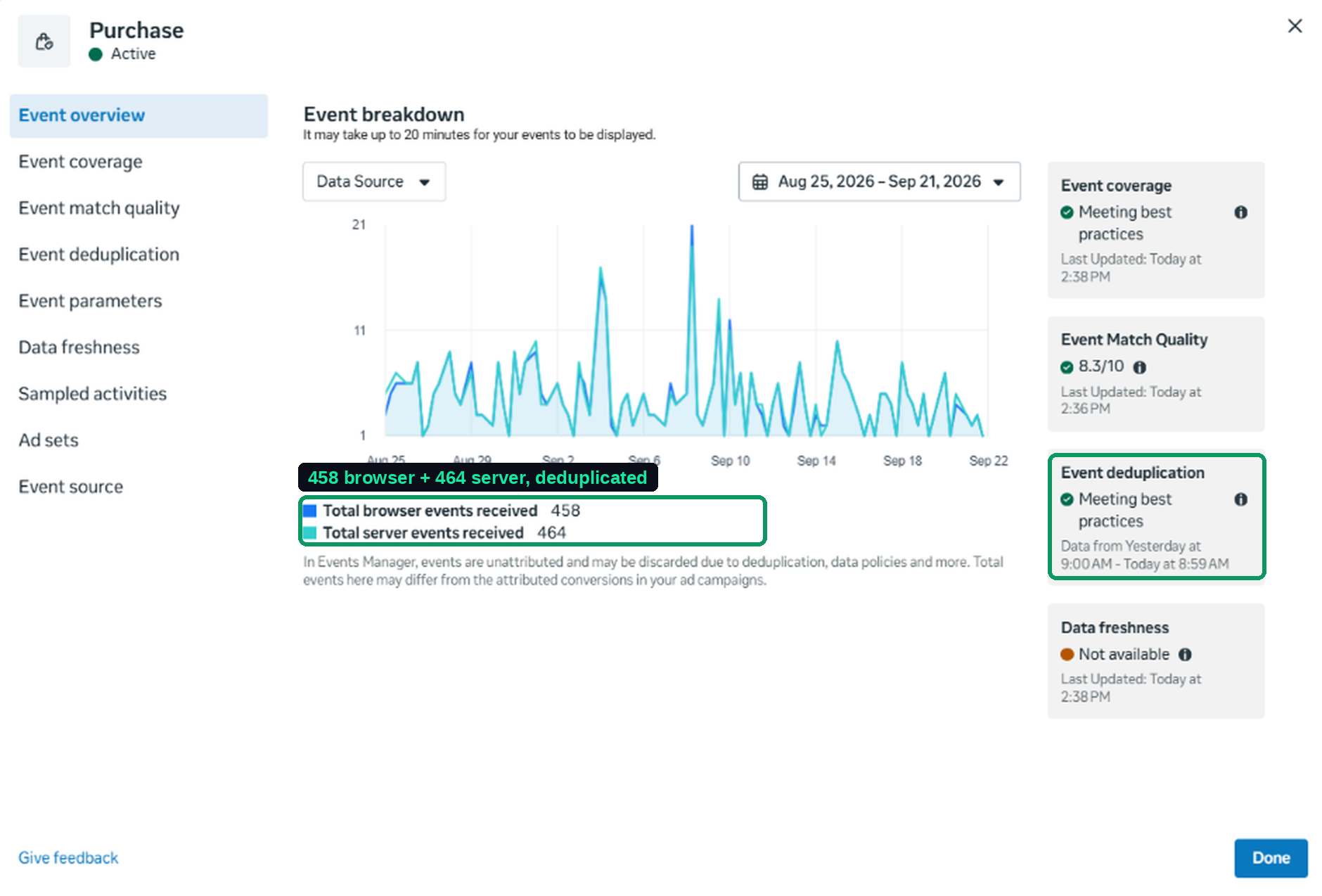
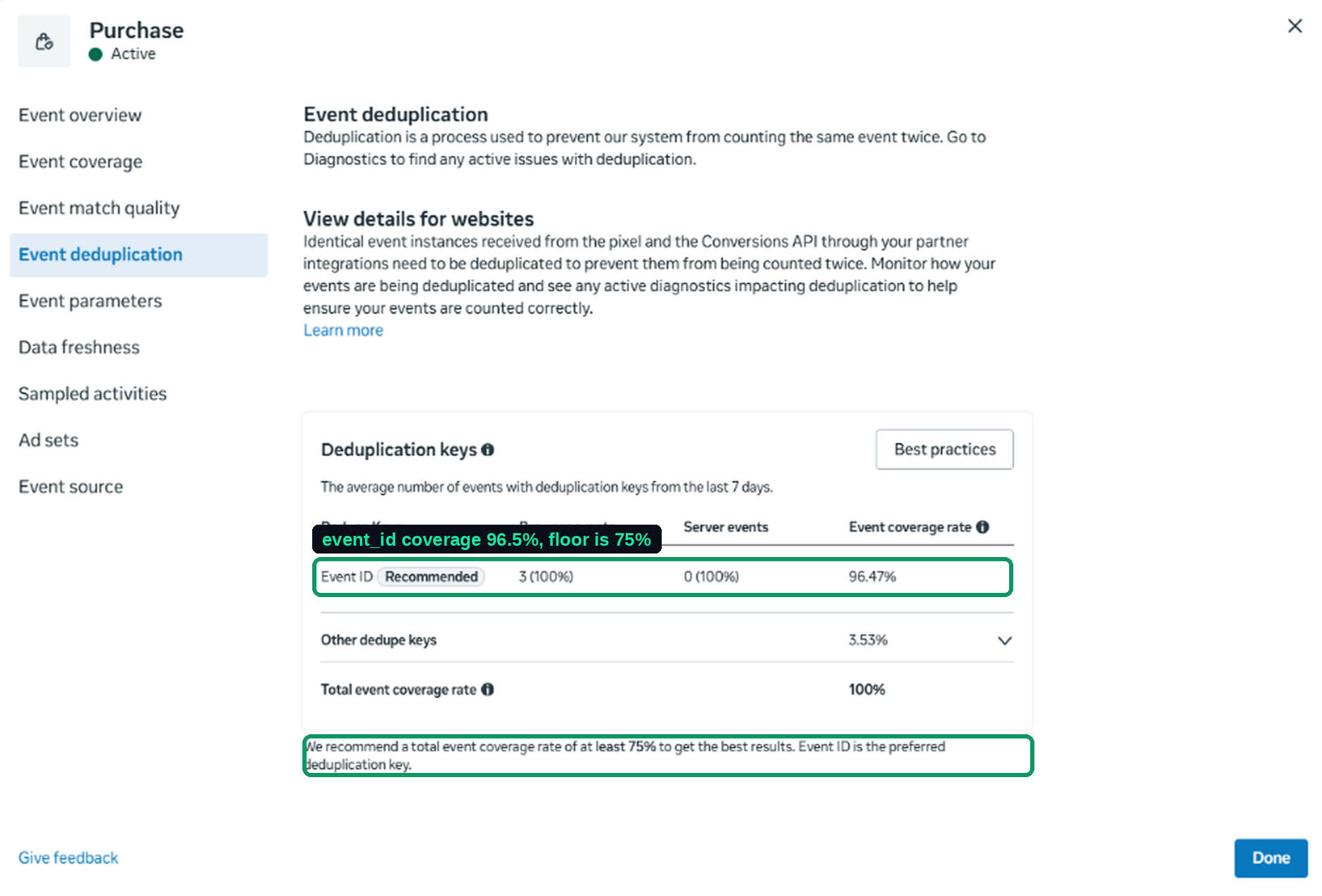
Here is what a healthy setup looks like. In a US ecommerce account we manage, doing around 450 orders a month, the pixel sent 458 Purchase events in the 28 days to September 21 and the server sent 464. The Total events column in Events Manager shows 922, because it counts everything received before deduplication. Ads Manager reports one purchase per order, because the event ID matched on 96.5% of the pairs and other keys covered the rest. Without that shared ID, this store would be reporting 922 purchases a month and roughly double its real ROAS.
The six extra server events are purchases the pixel never saw. That small gap is exactly what CAPI exists to close, and it grows with the share of your customers on iPhones.
CAPI replaces the pixel.
CAPI runs alongside the pixel and depends on it. The pixel supplies the browser identifiers and the shared event ID that let Meta deduplicate and attribute. Turn the pixel off and both your match quality and your attribution drop.
Event Match Quality (EMQ) explained simply
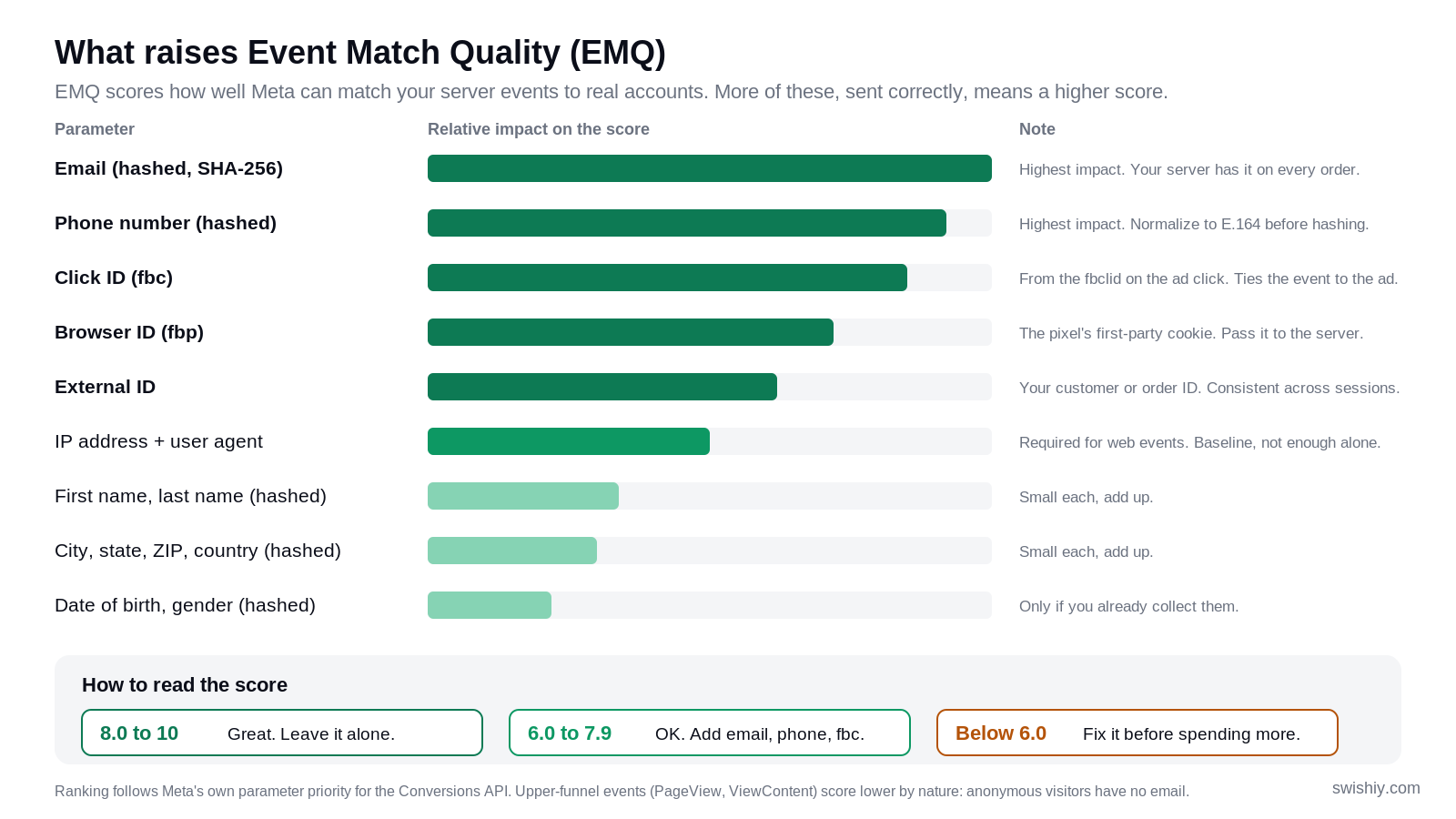
Event Match Quality (EMQ) is a score from 0 to 10 that Meta gives each event you send from the server. It measures how well Meta can match that event to a real Meta account, based on the customer information you include. A higher score means more of your conversions get attributed and used for bidding. Meta labels 8.0 and above as great, 6.0 to 7.9 as good, and anything below 6.0 as needing work. Treat 8 as the target on Purchase and Lead.
What raises it, in Meta's own priority order: hashed email, hashed phone, the fbc click ID, the fbp browser ID, an external ID such as your customer ID, then IP address and user agent, then hashed name, city, state, ZIP and country. Email and phone move the score most. IP address and user agent are required but do little on their own.
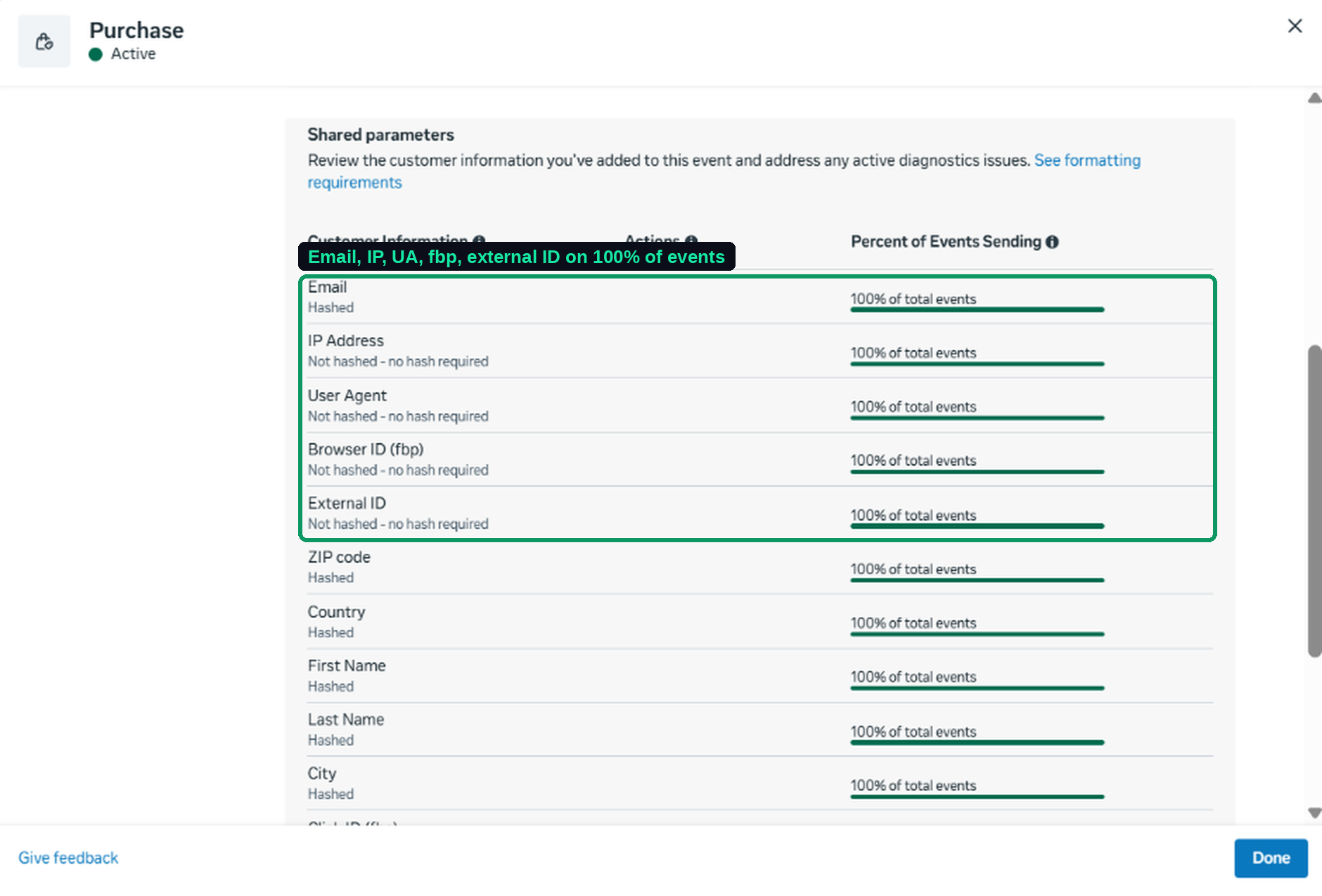
In the same account, Purchase scores 8.3. The server sends email, IP address, user agent, fbp, external ID, ZIP, country, name and city on 100% of purchase events, hashed where Meta requires it. The pixel alone could not do this: its Advanced Matching only captured an email on 51% of purchases, because the browser only knows the email when the visitor typed it on that page. The server knows it every time. That is the practical reason CAPI raises match quality.
One thing not to worry about: PageView, ViewContent and AddToCart score 5.7 to 5.9 in that account, and that is normal. Anonymous visitors have no email or phone to send. Fix Purchase and Lead first.
The usual cause of a low score is a server that only sends IP address and user agent. Either the integration never got the customer data (Shopify data sharing left on Standard instead of Maximum, or a plugin that does not hash email and phone), or the fbp and fbc cookies never reach the server because checkout runs on a different domain. Healthy is 8 to 9 on Purchase and 7 to 8 on Lead. Under 6 means one of email, phone or the click ID is missing entirely.
4 ways to set up Meta CAPI (ranked by effort)
1. Shopify's native integration. The Facebook & Instagram app sends the standard events from Shopify's servers and sets the event ID for you. Set data sharing to Maximum, or the customer parameters do not go. Right for any Shopify store as the first step. The limit: standard events only, no control over parameters or consent, and it only covers Meta.
2. Partner integrations. WooCommerce's official Meta plugin, BigCommerce, Magento, and for lead events HubSpot, Klaviyo or Zapier. Deduplication is usually handled for you. Right for stores on those platforms, and for lead-gen sites where the CRM is the source of truth. The limit: you get the events the partner supports and nothing more.
3. Server-side Google Tag Manager, hosted on Stape, Addingwell or Google Cloud. One server container receives every event and forwards it to Meta, Google Ads, GA4 and anything else, with one place to set the event ID, add customer data and respect consent. Right for anyone running more than one ad platform, anyone not on Shopify, and anyone who needs consent handled properly. The limit: hosting costs money and someone has to maintain it. We compare what server-side GTM hosting costs in a separate post.
4. Custom, from your backend. Your own code calls Meta's API when an order is created. Right for teams with a developer, or when the event lives in a CRM rather than on the site. The limit: you own the dedup logic, the hashing, the error handling and every future API change.
Our rule: a Shopify store under $5,000 a month uses route 1 and stops reading. Multi-platform or off-Shopify, route 3. Route 4 only with a developer on staff.
What usually breaks with CAPI (and how to spot it)
| Failure | What you see | Why | Where to look |
|---|---|---|---|
| Duplicates | Purchases near double your orders. ROAS looks excellent. | Pixel and CAPI send Purchase with no matching event ID, or the event names differ. | Purchase, Event deduplication. Coverage under 75% is the tell. |
| Low EMQ | Purchase EMQ under 6. Cost per result creeping up. | The server sends only IP and user agent. No hashed email or phone, no fbp or fbc from the browser. | Event match quality, Shared parameters. Anything under 100% on email, fbp or fbc is the gap. |
| Test events left on | Reporting is thin or empty. | A test event code left in the live payload. Meta keeps those events out of reporting. | Test events tab. Nothing from production should be there. |
| Wrong event names | Two similar events, one custom. Ad sets cannot optimize for it. | The server sends Purchase_Server or Order Completed instead of the standard Purchase. | The events table on the dataset overview. |
| Consent ignored | Server events for visitors who declined cookies. Legal exposure, and a mismatch with your Google Ads conversion tracking, which respects consent. | The server container or plugin fires regardless of consent state. | Fresh browser, decline, buy a test product, look for a server event. |
| Coverage gap | The server sees fewer purchases than the pixel. | The server tag fires conditionally, the container went down, or some checkout paths are not covered. | Purchase, Event coverage. Meta's goal line is 75%. |
How to audit your CAPI setup in 10 minutes
Open Events Manager, pick your dataset, click the Purchase row, then View details. This is the screen where the important numbers start telling the story.
• The Integration column reads "Multiple". "Meta Pixel" only means no CAPI. "Conversions API" only means the pixel is off.
• Event deduplication: event ID coverage near 100%. Meta's floor is 75%. Below it, orders are being counted twice.
• Event coverage: the share of pixel purchases also sent by CAPI is 75% or higher.
• Event match quality is 8 or above. Under Shared parameters, email, fbp, fbc, external ID, IP address and user agent are at or near 100%.
• Ads Manager purchases roughly equal your store's orders for the same 28 days. Close to double means dedup is broken.
• The Test events tab is empty of production traffic.
In Events Manager, is your Purchase event's deduplication coverage above 90%? If it is below, you are paying for phantom conversions. If you cannot find the screen, that is also an answer.
What CAPI actually costs (and when to bring in help)
Meta charges nothing for CAPI. The costs are hosting and setup. Shopify's integration is free. Partner plugins are usually free or bundled. Server-side GTM hosting starts at about $25 a month on Stape's basic plan, plus setup. A custom build costs developer time. The expensive option is doing nothing: duplicated purchases and low match quality quietly inflate your ROAS and misdirect Meta's bidding.
We set up server-side tracking with the pixel and CAPI deduplicated, consent handled, and every event validated against real orders before go-live. If your Purchase dedup coverage or EMQ is below the numbers in this post, that is the fix. See our server-side tracking setup, or talk through your setup with us.